How to Repurpose Content
Repurposing content isn’t about copying and pasting the same post everywhere. It’s about understanding how different platforms work, how your energy works, and how to turn what you’ve already created into a sustainable content system that doesn’t burn you out. In this post, you’ll learn how to repurpose content with intention, organize your ideas into a content bank, build a simple posting framework, and use your Human Design to create content that actually supports your business.
How to Repurpose Content for Different Platforms
Repurposing content isn’t about duplicating the same post across every platform. It’s about adapting your message for different audiences, attention spans, and consumption habits.
Your LinkedIn audience is not your Instagram audience.
And if you treat them the same, your content will underperform everywhere.
When you repurpose content properly, you’re asking:
Who is on this platform?
What are they here for?
How do they consume content here?
What action do I want them to take?
Repurposing content is about strategy, not shortcuts.
If your plan is to copy and paste the same content everywhere, don’t repurpose it at all.
Repurpose with purpose.
Things to Consider When Repurposing Content for Different Platforms
Before you repurpose any piece of content, you need to understand the platform you’re repurposing it for.
Ask yourself:
Who is on this platform?
What is their attention span here?
What are they looking for? (Search intent matters.)
How do they typically consume content on this platform?
Different platforms require different approaches.
A LinkedIn audience is not the same as an Instagram audience.
They are in different modes, with different expectations, and different reasons for scrolling.
You cannot take an article written for LinkedIn and simply repost it to Instagram, even in part.
Even Facebook and Instagram audiences behave very differently and respond to different content.
Content needs to be reworked for the platform, not just reshared.
Repurposing content effectively means shaping the same core idea to match:
how people read,
how long they stay,
and what they want to do next.
When you respect the platform, your content lands better everywhere.
Where to Start Repurposing Your Content
There’s a common misconception that you must start with a long-form piece of content like a blog post or podcast episode.
You don’t.
You can just as easily start with something small and build from there.
A 30-second Instagram reel can become:
a blog post,
a podcast episode or audio version of the blog,
and 3 to 5 Pinterest pins that drive traffic long after the content is published.
That blog post becomes the backbone of your content ecosystem.
Your Pinterest pins send cold traffic to the blog.
Your blog and audio file include a clear CTA for a lead magnet.
That lead magnet builds your email list while you sleep.
And it keeps going.
Content repurposing works best when each piece has a job, and each platform supports the next step.
According to Meagan Williamson of Pin Potential, at the time of this writing, Pinterest allows you to reschedule pins
roughly two weeks after the first round to different boards.
This helps extend the life of your content and continue driving traffic to the same post for months or even years.
How to Use Your Human Design to Repurpose Content
Your Human Design plays a huge role in how you repurpose content, not just what you repurpose.
Yesterday, I delivered a workshop where people brought in a piece of existing content to “zuish up.” We worked with two examples: a manifestation sales page and a Human Design blog post.
In just over an hour, we uncovered how much content was already hiding inside what they’d created.
For the sales page, we:
Reworked the headline so it immediately hooked the reader and kept them reading.
Identified six core content concepts that could be repurposed into endless Instagram posts.
Pulled story ideas to naturally sell the final product, a low-ticket offer.
Simplified how manifestation was explained so ideal clients could clearly see what was in it for them, without esoteric or overly complicated language.
For the blog post, we:
Found the true opener. The original introduction buried the lead in fluff that wouldn’t pull readers in.
Identified more than 20 social media posts within a single blog post, which is a full month of content.
Uncovered the core message that had been sitting in the writer’s body all along, the thing she hadn’t quite given herself permission to say yet. Her own witch wound. The part that actually moves people.
And we did all of this in 70 minutes.
With time left over.
This is what aligned content repurposing looks like.
When you repurpose content through the lens of your Human Design, you’re not forcing ideas.
You’re extracting what’s already there and letting it land in the right places.
Tools to Repurpose Content Easily
The right tools make content repurposing simpler, faster, and far less overwhelming.
Instead of starting from scratch every time you sit down to create, you want a system that captures ideas as they come in
and stores them in a way that’s easy to access later.
For me, that tool is Trello.
What Is Trello?
Trello is my favourite tool for organizing content ideas and building a content bank.
With the free version, you can create up to 10 boards and then add lists and cards within each board. Visually, it works like a digital Post-it note system, which makes it easy to see everything at a glance.
I use Trello to organize:
podcast ideas,
blog content,
social media posts,
and business resources I don’t want to hunt for every time I need them.
As a Manifesting Generator in Human Design, ideas come to me in response. When something sparks, I add it to the board it belongs to. This means I’m never staring at a blank screen when it’s time to create.
At the moment, I have hundreds of content ideas stored on my social media board alone.
Which Boards to Create in Trello
Ultimately, the best Trello setup is the one that works with how you create.
That said, here’s how I currently use Trello to organize my content, business, and ideas. At the moment, I’m using 9 of the 10 free boards available.
Ideas Board
This board is non-negotiable for me.
With an open Head Centre in Human Design, ideas are always swirling. Keeping them captured here frees my mind and stops me from trying to remember everything.
This is where raw ideas live. No pressure. No polish.
Social Media Inspiration Board
This board holds inspiration I want to revisit later.
I save:
reels,
audio clips,
carousel ideas,
and posts I’d like to recreate in my own voice.
Nothing here is finished. It’s simply reference material for when I’m in response and ready to create.
Social Media in Process Board
This is where content starts to take shape.
I store:
captions in progress,
quotes I want to turn into graphics,
posts that are written but not yet scheduled.
When I’m ready to create visuals or batch content, this board is my starting point.
Unjaded Podcast Board
Everything related to my podcast lives here.
This includes:
episode ideas,
guest names and outreach notes,
links to podcasts I’ve been interviewed on,
recommended equipment,
and anything else podcast-related.
If it touches the podcast, it goes on this board.
Content by Design Course Board
This board is specific to my course.
I keep a list for each student, which includes:
their original goals,
the struggles they were having with content,
their business model,
and the products they currently offer.
I also link directly to their Google Docs so I can edit copy and track progress as we move through the course together.
My Business Board
This board holds all the things that would otherwise get lost in my computer files.
I keep:
links to articles I’ve written for other sites,
domain and tech information,
processes I don’t use often enough to remember by heart.
If I’ve ever had to search for something more than once, it belongs here.
Market Research Board
I’m always collecting data in my business.
I ask questions through:
Instagram stories and polls,
emails,
workshops,
and everyday conversations.
Whenever possible, I capture insights and pain points here so I always have real language from my audience on hand when creating content.
Testimonial Board
This board saves me hours.
Any testimonial, message, or piece of feedback goes here. When testimonials aren’t centralized, they get lost, and I end up wasting time digging through old files.
If you run out of boards, this can also live inside your business board.How to Get More Trello Boards Without Upgrading
How to Get More Trello Boards Without Upgrading
Here’s a simple hack if you need more than the 10 boards included in Trello’s free plan.
You can create an additional workspace.
Each workspace comes with its own set of boards, even on the free version. This means you can effectively expand your board limit without paying for an upgrade.
You can also invite others to join your workspace if you want to collaborate or share boards.
Simple. Effective. No extra cost.
How to Start Creating Content in Trello
If you’re wondering what to actually save in your Trello boards to support content creation, start here.
Your goal isn’t perfection. It’s collecting raw material you can respond to later.
Here are some simple things to add to your content boards:
Screenshots of photos, posts, or hooks you love.
Articles that inspire you or spark a reaction.
Quotes you hear or say that stop you in your tracks.
Responses to polls and questions from your Instagram stories.
Emails from others that you genuinely enjoy reading.
Links to YouTube videos or podcast episodes that light something up in you.
This becomes the foundation of your content bank.
When it’s time to create, you’re no longer starting from zero. You’re responding to what’s already there.
How to Use Your Human Design to Create Content!
How to Repurpose Content as a Human Design Generator
As a Human Design Generator, the magic in your content creation comes from response.
When something lights you up, sparks your interest, or creates a full-bodied yes, that’s your cue to create.
I know you can’t always post in the exact moment of response, and that’s okay.
When you can’t share right away, capture the idea. Add it to your Trello board or your content scheduler and trust that the energy of response will still carry through when it’s published.
Over time, you’ll build a content bank full of ideas you can respond to again and again.
When you revisit your own content to repurpose it, notice what hits you in the reread.
Maybe an old Instagram post lights up your Sacral. Take five minutes and:
turn it into a reel,
expand it into a blog post,
pull quotes for Pinterest pins,
or record a short YouTube video.
Repurposing content as a Generator isn’t about forcing consistency. It’s about responding to what’s alive now, even when that response comes from something you created weeks or months ago.
Content creation gets easier when you let response lead.
How to Repurpose Content as a Manifesting Generator
Just like Generators, the magic for you as a Manifesting Generator is in what’s alive right now.
You’re designed to respond, build, pivot, and work on multiple things at once. And yes, that gets to be okay.
While your audience still needs a clear understanding of how you help them, within that structure you need freedom. Variety isn’t a flaw in your content creation. It’s a feature.
Keep a Trello board where you capture everything that lights you up in the moment. Ideas, reactions, half-formed thoughts. This becomes a goldmine when it’s time to repurpose content.
Allow yourself to have multiple posts in different stages of completion inside your scheduler.
When your fire is on, you’ll move through them quickly and create a lot at once.
This is where repurposing works in your favour.
One idea becomes:
a post,
a reel,
a story,
a blog,
and a pin.
You don’t need to slow yourself down to be effective. You need systems that can keep up with you.
How to Repurpose Content as a Human Design Projector
Many Projectors feel stuck when it comes to content creation because they believe they’re supposed to wait for an invitation to create.
As a Human Design Projector, invitations matter for the big things in life. Not for every piece of content you share.
What does matter is recognition.
That feeling in your body when someone is open to receiving your guidance. Many Projectors can sense this intuitively, even if they can’t always explain how.
Here’s the reframe that changes everything:
When someone follows you, reads your blog, or listens to your podcast, they are already inviting you in.
That’s recognition.
That’s permission.
Trust that.
One powerful way to support your content creation process as a Projector is to use what you’ve already created as your invitation point.
Revisit old posts, blogs, or podcast episodes and notice what still feels relevant. Repurposing content allows you to guide without constantly initiating from scratch.
You can also use AI as a reflective tool.
Put a piece of content you’ve written into an AI platform and ask it to reflect back what it sees. Not to rewrite it, but to help you recognize the value, clarity, or insight already present.
This can help you feel the recognition you need to move forward and share more confidently.

How to Repurpose Content as a Human Design Manifestor
Everyone seems to want to be a Manifestor, yet many of the Manifestors I’ve worked with feel more stuck than anyone else.
Why?
Because they’ve been conditioned to believe their power is disruptive or too much.
If this resonates, content creation becomes an opportunity to reclaim your voice.
As a Manifestor, you are here to initiate.
You don’t need permission to speak. You don’t need consensus. You don’t need to wait until everything is fully formed.
You start.
Start anywhere.
Say the thing that’s been sitting in you.
Then elaborate on it.
That initial spark can become:
a longer blog post,
a podcast episode,
or the foundation for multiple pieces of content across platforms.
And then, if you can, delegate.
Manifestors are not designed to do everything themselves. Having someone repurpose, edit, or extract content from what you initiate allows you to stay in your role and conserve energy.
Let this be okay.
The world needs what you start.
How to Repurpose Content as a Human Design Reflector
I am not a Human Design Reflector.
My lived experience is that of a Manifesting Generator, which is very different from yours. So what follows is observation, not authority.
From what I’ve seen, the magic for Reflectors lies in sharing what you’re noticing in your community, not the world at large.
And timing matters.
I don’t see Reflectors thriving by heavily repurposing content from a year ago. Instead, your strength seems to be in responding to what’s happening now and sharing reflections while they’re still alive.
This doesn’t mean you can’t repurpose content. It just means your repurposing works best in tighter, more immediate loops.
What this might look like in practice:
You record a podcast episode.
From that episode, you create 5 social media posts and a few stories for the week.
Your show notes become a blog post.
You create 3 Pinterest pins that link to either the blog post or the podcast episode.
That’s a full week of content, built from one central piece.
You may still create content in batches, but you’ll likely need space to add reflections as they arise. Your value comes from mirroring what’s present, not from forcing consistency for consistency’s sake.
We rely on you to reflect what’s happening now.
Creating a Framework of Posts for Social Media
No matter your Human Design type, creating a basic framework or skeleton of content can be incredibly freeing.
This framework is the baseline for how often you show up online. It’s not rigid. It’s supportive.
Think of it as the structure that holds your content when you don’t have the energy to be “on.”
For example, you might decide that your baseline is three posts per week.
You can schedule those in advance, and then when you’re in response or inspiration strikes, you add posts live. Or you don’t.
The point is that the framework is there to support you, not pressure you.
This matters because life happens.
You might be:
a 2nd line Profile who needs to hermit,
in a low point of your emotional wave,
or simply honoring a quieter season.
Your skeleton of content allows you to honour your energy without disappearing completely.
If your goal is three posts per week, you only need twelve posts to carry you through an entire month.
That might sound like a lot, but once you start creating and repurposing content, twelve posts come together far more quickly than you think.
Your framework keeps things steady.
Your response fills in the rest.
Would You Like to See How I Do This Live?
Once you have a skeleton of content in place, scheduling becomes the next layer of support.
This is where SmarterQueue comes in.
If you grab SmarterQueue through my affiliate link, you’ll get twice as long to trial the platform, and I’ll walk you through how I use it to create and schedule a month’s worth of content in a way that still leaves room for response.
I’ll show you:
how I organize posts,
how I reuse and repurpose existing content,
and how I build a sustainable content rhythm that works with my energy, not against it.
This isn’t about filling a calendar for the sake of it.
It’s about creating structure so you don’t burn out.
Here’s the link to grab your extended free trial of SmarterQueue.
3 Things I Love About The Smarter Queue Social Media Scheduler
1. It pulls your past content so you can repurpose it
This was the feature that sold me.
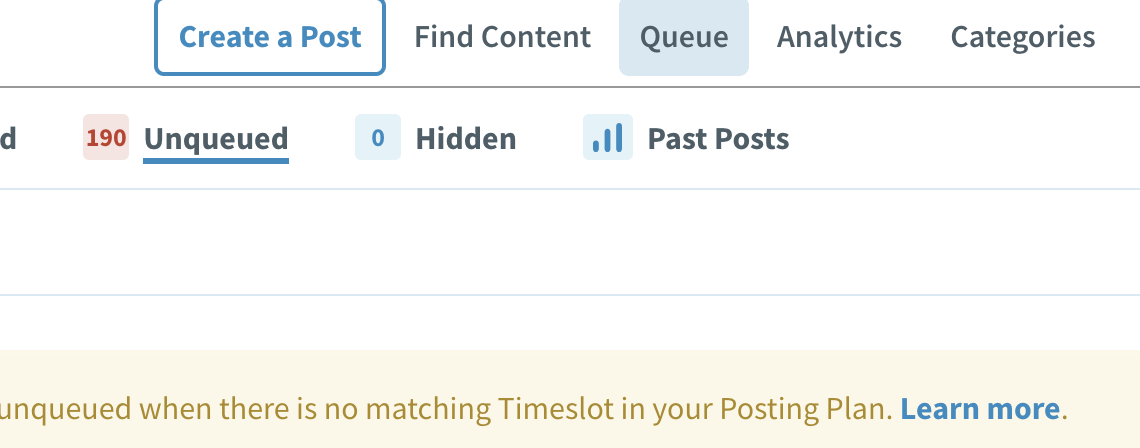
SmarterQueue can pull in all of your past posts, or you can give it specific criteria, like posts with the most engagement. Those posts land directly in your drafts, ready to be repurposed.
Right now, I have over 190 posts sitting in my drafts that I can revisit, reuse, and reshape.
As a Manifesting Generator, this is gold.
2. You can organize content into categories
SmarterQueue allows you to create content categories and assign posts to each one.
Once you’ve set up a basic schedule, SmarterQueue automatically fills your posting slots using those categories. This means your content stays balanced without you having to think about it every day.
3. You can repurpose each post multiple times
For every post, you can create multiple variations and schedule them out months apart.
I usually create three versions of each post, each with a different image, and schedule them over time. One post becomes three, without feeling repetitive.
Over time, your content calendar fills itself.
This means that each post I create is at least 3 posts in one.
Once you have done this for a while, your posting calendar is FULL for months to come.
Now…. as I said, use tools like Trello and Smarter Queue to create the skeleton of content that you need.
Then, allow yourself to follow your strategy in the moment to bulk it up.
Here’s my affiliate link for your Smarter Queue trial.
It gives you an extended free trial and access to my training on building skeleton content that lasts all year.
How to Repurpose Blogs and Sales Pages (Without Burning Yourself Out)
If this post is helping you see how much content you already have, but you’re still wondering why your content isn’t leading
to clients or sales, the next step isn’t more repurposing.
It’s getting crystal clear on exactly how to speak your message in a way that brings you paying clients.
That’s exactly what Pathway to Profit, the private podcast is designed to support.
Inside Pathway to Profit, we zoom out and look at:
why content often stays busy but unprofitable,
how offers need to be built and sold in today’s market,
and what needs to shift so your content starts doing its job instead of just filling space.
This podcast shows you where your message fits, inside a sustainable business, not just a content system.
If you’re ready to stop creating in circles and start connecting your content to real demand, this is where I’d point you next.
Access the private podcast here for just $27